- Published on
Home network security upgrade, part 3: Security Onion on Proxmox with a switch mirror port
- Authors

- Name
- Peter Peerdeman
- @peterpeerdeman
This is part 3 of a series on the hashbang home network security upgrade:
- from a flat LAN to VLAN zones on OPNsense
- blocking Modbus writes to a home battery with Suricata
- Security Onion on Proxmox with a switch mirror port (this post)
- agentic blueteaming with Security Onion
With the network split into VLAN zones, the firewall decides what is allowed, but I also want to get visibility into what is actually happening. Which devices talk to what, which DNS names they resolve, and whether anything looks malicious or is suitable for further hardening of the network. OPNsense runs Suricata, but only on the flows that a firewall rule explicitly hands to it. A few years ago I built a test lab running intrusion detection with Snort, Vector and Loki on pfSense, but this time I wanted to go all the way and implement a full Security Operations Center (SOC) solution: Security Onion including with Zeek, Suricata, full packet capture and a SOC interface.
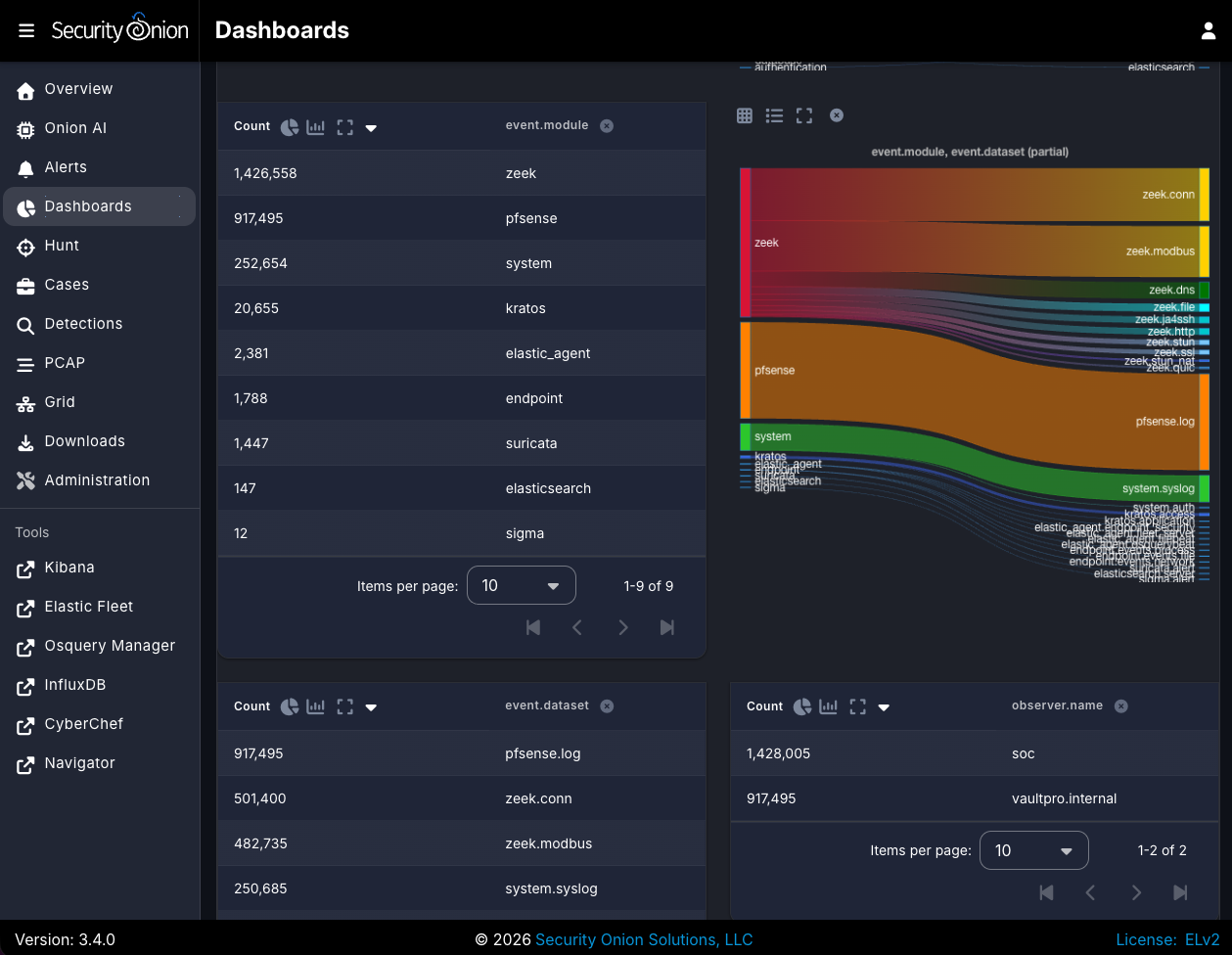
planning the hardware and installation
Security Onion runs as a VM on my Proxmox box. The VM gets access to two network interfaces:
- a management NIC on the regular VLAN-aware bridge, which is tagged with its own SECURITY VLAN in proxmox
- a USB ethernet adapter, passed through to the VM, cabled to a switch port that mirrors the uplink to the router
Every VLAN is routed by the firewall, so the trunk between switch and firewall carries:
- internet traffic of every VLAN, with internal addresses
- all traffic between VLANs
- plaintext HTTP from the reverse proxy to its backends
- decrypted WireGuard traffic heading into the VLANs
- DNS, DHCP and NTP to the firewall
It's also good to know what it doesn't see:
- traffic that stays inside one VLAN, e.g. two servers in the same zone, wifi clients talking to each other
- anything on a firewall port that isn't the trunk
That turned out to be a good complement to Suricata on OPNsense: the firewall inspects the flows it diverts, and Security Onion sees traffic that the divert rules never touch.
step 1: a SECURITY VLAN
Security Onion parses hostile traffic all day, so we figured it shouldn't sit in the management VLAN next to the switches and virtual machine hosts. It gets a SECURITY VLAN with the same ISOLATED firewall group as the other zones: pass DNS and NTP to the firewall, internet for updates, but no connections to anything internal. Only admin devices on WireGuard are configured to reach its web interface and SSH.
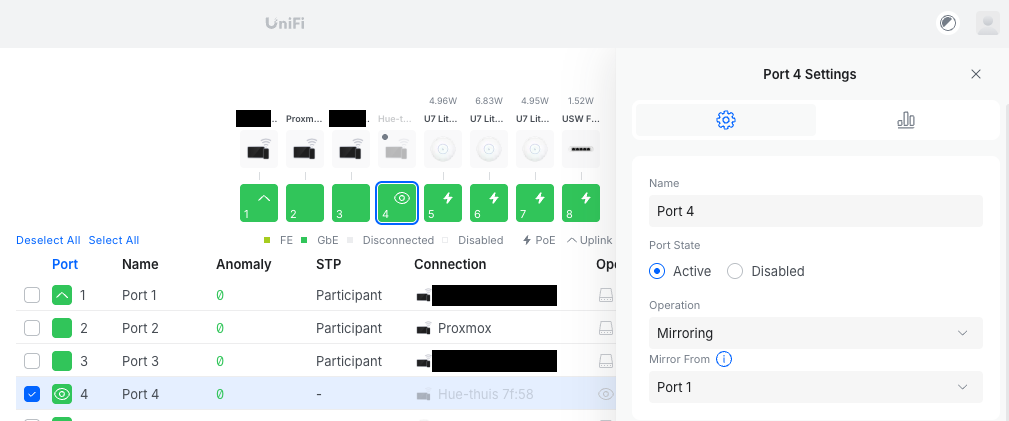
step 2: free a switch port and mirror the uplink
In the switch controller we configured one of the ports as a mirror for the uplink port (in Unifi, this is Devices → switch → port 4 → Operation: Mirroring)
step 3: creating the VM
qm create 105 --name securityonion --ostype l26 \
  --machine q35 --cpu host --cores 4 --memory 16384 --balloon 0 \
  --scsihw virtio-scsi-single \
  --scsi0 nvme:500,ssd=1,discard=on,iothread=1,backup=0 \
  --net0 virtio,bridge=vmbr0,tag=15,firewall=0 \
  --usb0 host=0bda:8153 \
  --ide2 local:iso/securityonion-3.4.0.iso,media=cdrom \
  --boot 'order=scsi0;ide2' --onboot 1
Note that --usb0 host=0bda:8153: passes the adapter through by vendor and product ID.
16 GB of RAM is below the documented 24 GB minimum for a standalone install. It works, setup warns about it, but so far it has worked out pretty well with about 14-15 gb of 16GB constantly in use.
step 4: install
We used the gui installer through the Proxmox console. Choose STANDALONE, give the management NIC a static address, and select only the USB adapter as the monitor interface. Set the home networks to every internal range, and the allowed analyst IPs to the WireGuard admin range. Setup from that point took about an hour, there are a lot of moving parts that get set up on the machine!
step 5: firewall logs into Security Onion
The mirror doesn't see what ends at the firewall, so we configured OPNsense to send its firewall log to Security Onion via syslog. Security Onion's Elastic Fleet has a pfSense integration that also parses OPNsense:
- in SOC, add the pfSense integration to the grid node policy, listening on UDP 9001
- open UDP 9001 for the firewall's address in Security Onion's own host firewall (
Administration → Configuration → firewall, under the advanced settings) - in OPNsense,
System → Settings → Logging → Remote: sendfilter(andsuricata) to the VM
wrapping up
sudo so-statusin the terminal should show all services green- Zeek connection and DNS logs show hosts from several VLANs, both tagged and untagged
- a test alert:
curl http://httpbin.org/base64/dWlkPTAocm9vdCkgZ2lkPTAocm9vdCkgZ3JvdXBzPTAocm9vdCk=returns the textuid=0(root) gid=0(root) groups=0(root), which should trigger an alert "GPL ATTACK_RESPONSE id check returned root" (sid 2100498). For us it appeared in the SOC alerts within a minute, with the same community ID as the Zeek HTTP record
Then the real work started: the first 24 hours produced 144 unacknowledged alerts, and about 120 of them were noise. Instead of clicking through all of them myself, I tried some agentic blueteaming and let the AI agent assist me with triage. That's written up in part 4: agentic blueteaming with Security Onion.