- Published on
E-ink domotics dashboard using Home Assistant, puppet and FBInk on a Kobo Clara
- Authors

- Name
- Peter Peerdeman
- @peterpeerdeman
An always-on dashboard in the house has been on my wishlist for quite a while. Somehow, I never really went for it before. Recently I saw a live PV / Grid consume / Grid delivery panel at a friend's house, and with the recent pv solar wifi stick mod in place, it was about time for a first prototype of this solution.
As I don't want another device emitting light, drawing our gaze and messing with our natural sleep rhythm, the solution had to be E-ink. There are some off the shelf products available, such as the proprietary TRMNL and the diy Inkplate, but I had a Kobo e-reader that is seeing some idle time recently, and that turned out to be a perfectly capable platform for the first prototype.
screenshots instead of a browser
The lazy plan would be to point the Kobo's built-in browser at a home assistant dashboard in a sort of kiosk mode and call it a day. Unfortunately, that does not work as the experimental browser can't run the home assistant dashboard without javascript.
The approach that some had used online is to take screenshots with a headless browser, and render the images to the Kobo screen.
For this rendering I use balloob's puppet add-on, a headless Chrome that screenshots any home assistant view. Home Assistant was already running in a docker-compose, so we only had to add the extra container. Requesting a URL and getting a grayscale PNG back:
http://<puppet-host>:10000/<token>/kobo-dashboard/0?viewport=1448x1072&zoom=1.76
rooting and rendering on the kobo
The Kobo needed three pieces to work:
- KFMon -> inserting a launcher button to run your own scripts
- FBInk -> drawing a PNG straight to the e-ink framebuffer
- a bash script that fetches the image from puppet and draws it with FBInk
kfmon
The documentation and the forum thread about this are all over the place. In the end, I used the one click kobo install packages to get KOreader started, from which you can enable a SSH server to get a root shell on the device.
To turn the reader into a dashboard the script kills nickel, the Kobo UI, and also hindenburg, the watchdog that otherwise brings nickel back a minute later.
fbink
FBInk is the app that is used to draw to the screen. The version of FBInk is important here, the latest release on github (1.25.0 from 2022) does not support the latest kobo devices, while the latest master branch does. To get one of the latest compiled versions, you can peek into the fbink workflows and grab a binary from one of the recent builds there, and install it to the kobo via SSH.
the script
The launcher script got tweaked a couple of times, starting off as a simple drawing to the screen loop and ending up with a couple of extra features:
- I tried finding a balance between a nice refresh time to make it feel real-time, but not draw too much power. Achieved through faster refresh rate during breakfast time and dinner time
- deghost, by only clearing the screen every x refreshes
- adding SSH dropbear to provide a way back in without resetting the device
- adding support for refresh and reboot commands via writing files through ssh
#!/bin/sh

# ---------- config ----------
BASE_URL="http://puppetserver:10000/kobo-dashboard/0"
QUERY="viewport=1448x1072&colors=000000%2C242424%2C494949%2C6D6D6D%2C929292%2CB6B6B6%2CDBDBDB%2CFFFFFF&lang=en&rotate=90&zoom=1.76&wait=5000"
URL="${BASE_URL}?${QUERY}"

FBINK=fbink                       # full-path it if KFMon can't find it on PATH
IMG=/tmp/dash.png
CTRL=/mnt/onboard/.dash           # drop control files here

INTERVAL_NORMAL=120               # seconds between refreshes (normal)
INTERVAL_MORNING=30               # seconds between refreshes in the morning window
MORNING_START=6                   # 06:00
MORNING_END=10                    # up to (not incl.) 10:00
TICK=5                            # how often to check control files, seconds
DEGHOST_EVERY=10                  # do a full flashing refresh every Nth draw
# ----------------------------

mkdir -p "$CTRL"

# take over the screen (kill UI + the watchdog that respawns it)
killall -q -TERM nickel hindenburg sickel fickel 2>/dev/null

# guarantee an SSH way back in; dropbear survives nickel being gone.
pidof dropbear >/dev/null 2>&1 || dropbear -R >/dev/null 2>&1 &

# draw [flash]
#   no arg  -> fast, no-flash update (no flicker, but ghosts over time)
#   "flash" -> full flashing refresh (brief flash, clears ghosting)
draw() {
  wget -q -O "$IMG" "$URL" || return 1
  if [ "$1" = "flash" ]; then
    "$FBINK" -q -f -g file="$IMG"
  else
    "$FBINK" -q -g file="$IMG"
  fi
}

count=0
draw flash                        # clean first paint

while true; do
  H=$(date +%H); H=${H#0}         # strip leading zero to avoid octal (08/09)
  if [ "${H:-0}" -ge "$MORNING_START" ] && [ "${H:-0}" -lt "$MORNING_END" ]; then
    INTERVAL=$INTERVAL_MORNING
  else
    INTERVAL=$INTERVAL_NORMAL
  fi

  # wait out the interval in small ticks so control files act within ~5s
  waited=0
  forced=0
  while [ "$waited" -lt "$INTERVAL" ]; do
    [ -f "$CTRL/reboot" ]  && { rm -f "$CTRL/reboot";  reboot; }
    [ -f "$CTRL/refresh" ] && { rm -f "$CTRL/refresh"; forced=1; break; }
    sleep "$TICK"
    waited=$((waited + TICK))
  done

  # flash on a manual refresh or every DEGHOST_EVERY draws; otherwise silent
  count=$((count + 1))
  if [ "$forced" -eq 1 ] || [ "$count" -ge "$DEGHOST_EVERY" ]; then
    draw flash
    count=0
  else
    draw
  fi
done
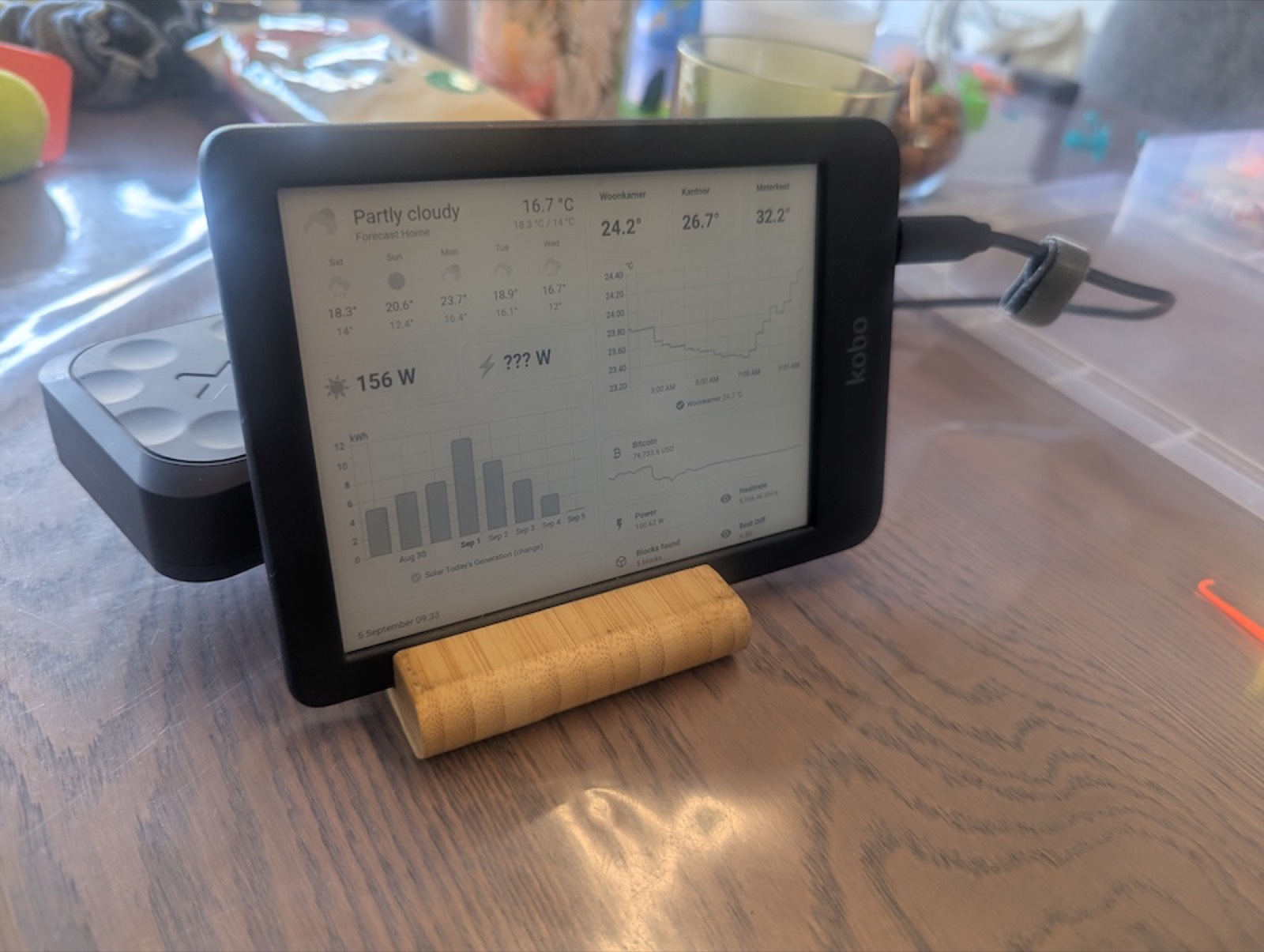
Now the fun part began, which was deciding which widgets to show on the screen. I found the markdown tile very useful to print data in a little bigger font, and avoided customising the styling of the tiles. The historic bar charts and line charts render quite well, and using emoji's helps to create some visual support between all of the stats.
Putting the kobo in landscape mode on an ikea tablet stand, and wiring it to a big 20.000mA battery pack makes it a nice portable prototype to experience live stats from the dinner table. Maybe we will bolt it to the wall at some point, but let's see if we still enjoy the stats after a couple of weeks first.